Quentin Guilloteau
Post-Doc in Computer Science
INRIA/LIP

A Case Against Nix Flakes In Experimental Computer Science
20 Jul 2026
I am a Nix user and I interact with Workflow Managers for managing the execution of my experiments. The following is the conclusion I reached regarding how Nix Flakes interact with Workflow Managers.
Workflow Managers
In experimental computer science, authors have to write programs, compile them and then execute them in various configurations (software or hardware). The design of experiment step can yield hundreds or thousands of configuration given the number of dimensions to vary. Effectively executing theses experiments and keeping track of the results is challenging to do by hand. However, tools such as Workflow Managers 1 make it possible to express complex experiments.
These tools track the dependencies of each results and are thus able to rerun experiments when they observe a change in the dependencies. Moreover, as Workflow Manager usually work with a (directed acyclic) graph representation of the tasks to execute to generate the results, they are able to exploit parallelism, making the execution of the entire workflow efficient.
Unfortunately, the adoption of Workflow Managers is limited outside of bioinformatics.
For instance, we2 showed that in the parallel and distributed computing field, workflows managers are unfortunately rarely used.
Instead, authors provide a README file listing the commands to execute manually or a fragile shell script executing the commands sequentially.
Functional Package Managers
Another crucial aspect of reproducibility in compute science is the software environment. In practice, this aspect is best addressed by using Functional Package Managers (FPM), such as Nix or Guix, to managed the software depedencies. With FPMs, the software environment is described in a declarative manner (using the Nix language for Nix and Guile Scheme for Guix) and stored in files. These files are then parsed and evaluted by the FPMs to (re)produce the software environment.
As the software environment can affect the result an experiment3, it must also be captured within the Worflow description.
In practice this means adding the .nix or .scm files as dependencies to each results.
Nix Flakes
In 2021, Nix introduced the experimental feature called “Flake”.
Nix Flakes are a new way to organize Nix expressions.
It also comes with a more ergonomic command line interface and simplified maintenance of Nix expressions.
The Flake representation also allows to easily distribute, share, reuse Nix expressions and packages without using the central package definitions repository (nixpkgs) or the Nix User Repository (NUR) structure.
While as of 2026, Flakes are still an experimental feature, despite its massive adoption in the community.
However, Nix Flake loss an crucial feature compared the original command line: the --pure flag of nix-shell.
Indeed, nix-shell --pure [...] creates a shell environment with the desired packages and only those.
It does it my setting the $PATH precisely.
Hence, within a nix-shell --pure shell, only the packages defined in the Nix expression can be used.
With the Nix Flake approach, the equivalent command (nix develop) does not have such a flag, and thus packages from the host machine and not describe in the Nix expression can be used in the shell.
The Nix Flake command line has flags which can be used to achieve a similar pureness, but fail to isolate the software environment with as much ease as the --pure flag456.
Case study
The scenario is the definition and execution of a workflow in the context of scientific experiments. Let’s say we have a Python script that takes as input some parameters and returns data as a CSV file. The CSV file is then used by a R script to analyze and plot the results.
As the generation of the CSV can take hours of compute, we would like to recompute only when necessary.
The workflow will look like:
- Enter a shell with Python
- Run the Python script (
main.py) - Exit the shell
- Enter a shell with R
- Run the R script (
analysis.R) - Exit the shell
In the following, we will use make as a Workflow Manager as its syntax is more popular for non-workflow manager users, and it allows us to express the same ideas.
Workflow with Nix Flakes
We can simply have a flake.nix as follows:
{
  inputs = {
    nixpkgs.url = "github:nixos/nixpkgs/25.11";
  };

  outputs = { self, nixpkgs }:
    let
      system = "x86_64-linux";
      pkgs = import nixpkgs { inherit system; };
    in
    {
      devShells.${system} = {
        pyshell = pkgs.mkShell {
          packages = with pkgs; [
            python3
          ];
        };
        rshell = pkgs.mkShell {
          packages = with pkgs; [
            R
          ];
        };
      };
    };
}
We separate the software environment in two different shells because someone that only wants to execute one part of the workflow must not have to install useless dependencies.
The resulting flake.lock will look like:
{
  "nodes": {
    "nixpkgs": {
      "locked": {
        "lastModified": 1764521362,
        "narHash": "sha256-M101xMtWdF1eSD0xhiR8nG8CXRlHmv6V+VoY65Smwf4=",
        "owner": "nixos",
        "repo": "nixpkgs",
        "rev": "871b9fd269ff6246794583ce4ee1031e1da71895",
        "type": "github"
      },
      "original": {
        "owner": "nixos",
        "ref": "25.11",
        "repo": "nixpkgs",
        "type": "github"
      }
    },
    "root": {
      "inputs": {
        "nixpkgs": "nixpkgs"
      }
    }
  },
  "root": "root",
  "version": 7
}
See that the flake.lock contains the revision of nixpkgs and its sha256.
The commands for our workflow might then be:
nix develop .#pyshell --command python3 main.py [ARGS] > data.csvnix develop .#rshell --command Rscript analysis.R data.csv plot.pdf
Now if we would describe the dependencies of each command, we would have:
data.csv depends on:
main.pyflake.nixflake.lock
plot.pdf depends on:
analysis.Rdata.csvflake.nixflake.lock
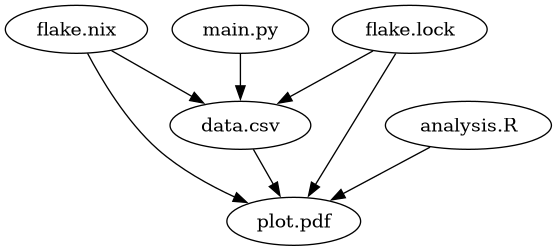
A simple Makefile would look like:
# Makefile
data.csv: main.py flake.nix flake.lock
	nix develop .#pyshell --command python3 $< [ARGS] > $@

plot.pdf: analysis.R data.csv flake.nix flake.lock
	nix develop .#rshell --command Rscript analysis.R data.csv $@
As running the Python script takes hours or days to compute the data.csv file,
what would happen if you wanted to add a R package?
For example:
# flake.nix
    # [...]
        };
        rshell = pkgs.mkShell {
          packages = with pkgs; [
            (rWrapper.override { packages = [ rPackages.tidyverse ]; })
          ];
        };
      };
    # [...]
In that case, flake.nix has been updated and this will trigger a recomputation of data.csv…
One way we could think of solving the problem is to extract the different shell expressions in different files:
# nix/rshell.nix
pkgs:
pkgs.mkShell {
  packages = with pkgs; [
    (rWrapper.override { packages = [ rPackages.tidyverse ]; })
  ];
}
and then:
# flake.nix
  # [...]
  devShells.${system} = {
    pyshell = import ./nix/pyshell.nix pkgs;
    rshell  = import ./nix/rshell.nix  pkgs;
  };
  # [...]
We could update the Makefile as such:
# Makefile
data.csv: main.py flake.nix flake.lock nix/pyshell.nix
	nix develop .#pyshell --command python3 $< [ARGS] > $@

plot.pdf: analysis.R data.csv flake.nix flake.lock nix/rshell.nix
	nix develop .#rshell --command Rscript analysis.R data.csv $@
The issue is that we still depend on flake.nix.
Hence, a simple override on nixpkgs will trigger a recomputation.
Or worse, simply adding a new shell (for example: nix jlshell = import ./nix/jlshell.nix pkgs)
The solution might then be to have several flake.{nix,lock} files:
# nix/pyshell/flake.nix
{
  inputs = {
    nixpkgs.url = "github:nixos/nixpkgs/25.11";
  };

  outputs = { self, nixpkgs }:
    let
      system = "x86_64-linux";
      pkgs = import nixpkgs { inherit system; };
    in
    {
      devShells.${system} = {
        default = pkgs.mkShell {
          packages = with pkgs; [
            python3
          ];
        };
      };
    };
}
Idem for rshell in nix/rshell/flake.nix.
The Makefile can then be:
# Makefile
data.csv: main.py nix/pyshell/flake.nix nix/pyshell/flake.lock
	nix develop ./nix/pyshell/ --command python3 $< [ARGS] > $@

plot.pdf: analysis.R data.csv nix/rshell/flake.nix nix/rshell/flake.lock
	nix develop ./nix/rshell/ --command Rscript analysis.R data.csv $@
The nix directory now looks like this:
nix/
├── pyshell
│   ├── flake.lock
│   └── flake.nix
└── rshell
    ├── flake.lock
    └── flake.nix
Note that it is possible to use a single flake.lock with the --reference-lock-file option of nix develop.
However, one problem of this architecture is that, in the case of an override for instance, we would need to have maintain several time the same code to do the override, as is might not be possible to share some nix code between the flake.nix files.
Workflow without Flakes
The workflow without flakes is much simpler.
We have a single file per shell:
# nix/pyshell.nix
{ channels, pkgs ? import channels }:
pkgs.mkShell {
    packages = with pkgs; [
        python3
    ];
}
Idem for rshell in nix/rshell.nix.
And the channels.nix file:
# nix/channels.nix
import (builtins.fetchTarball {
    url = "https://github.com/nixos/nixpkgs/archive/25.11.tar.gz";
    sha256 = "sha256:1zn1lsafn62sz6azx6j735fh4vwwghj8cc9x91g5sx2nrg23ap9k";
})
The Makefile is then:
# Makefile
data.csv: main.py nix/channels.nix nix/pyshell.nix
	nix-shell --pure --arg channels ./nix/channels.nix nix/pyshell.nix --command 'python3 $< [ARGS] > $@'

plot.pdf: analysis.R data.csv nix/channels.nix nix/rshell.nix
	nix-shell --pure --arg channels ./nix/channels.nix nix/rshell.nix --command 'Rscript analysis.R data.csv $@'
In this case, there is a clear separation of concerns: the function definition on one side (the pyshell.nix and rshell.nix files) and the function inputs on the other (the channels.nix file).
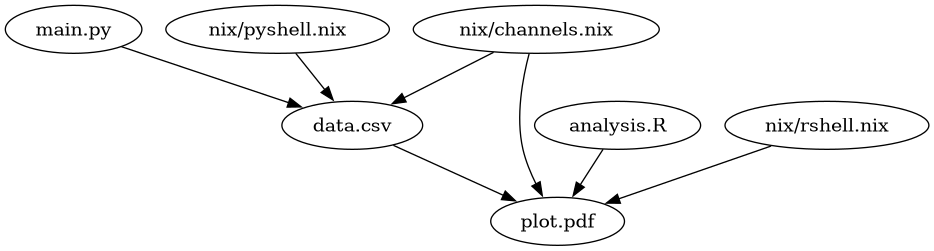
If we need to define an overide, we could have a other nix file with the resulting set of packages:
# nix/channels_overriden.nix
{ channels }:
import channels {
    overlays = [
        (final: prev: { }) # ...
    ];
}
This new file can be used a an input of the shells:
nix-shell --arg channels ./nix/channels_overriden.nix nix/pyshell.nix
Conclusion
While Nix Flakes have a great design for developing and distribute packages, they are not adapted to workflow of experimentation.
By coupling both the input and the functions in the same file, flakes breaks an important aspect of separation of concerns.
They make it more challenging to finely track the changes in the Nix environments to know if targets of the workflow need to be rerun or not.
Similarly to Makefiles which should include themselves as a dependencies of all the rules.
Moreover, the loss of the --pure option weakens the reproducibility of nix develop compared to nix-shell.
The workflow with the channels.nix and shell.nix files achieves a similar interface to Guix.
References
-
“Reproducible, scalable, and shareable analysis pipelines with bioinformatics workflow managers”, Wratten et al. ↩
-
“Longevity of artifacts in leading parallel and distributed systems conferences: A review of the state of the practice in 2023”, Guilloteau et al. ↩
-
“Producing wrong data without doing anything obviously wrong!”, Mytkowicz et al. ↩
-
https://discourse.nixos.org/t/nix-shell-pure-nix-command-equivalent/23058 ↩
-
https://discourse.nixos.org/t/why-doesnt-develop-or-shell-have-a-pure-mode/16745 ↩